

Printing at home
Everything is printed from Export (the button at the top right).
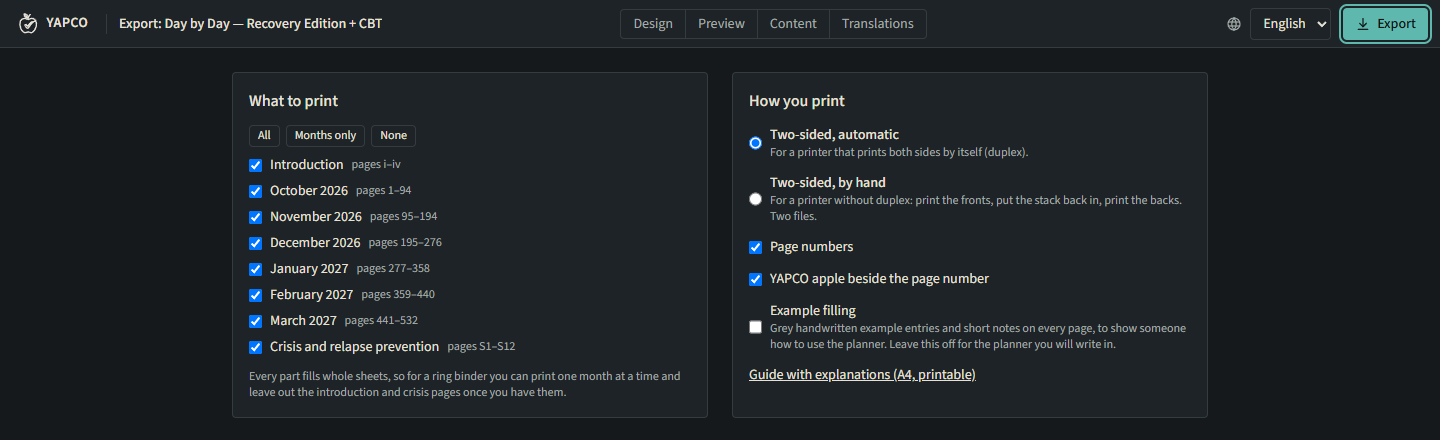
1. What to print
Section titled “1. What to print”Tick the parts: the introduction, each month, the crisis section. Every part fills whole sheets, so for a ring binder you can print one month at a time and leave out the introduction once you have it. Months only and All select quickly.
2. How you print
Section titled “2. How you print”| Option | For |
|---|---|
| Two-sided, automatic | A printer that prints both sides itself (duplex). Flip on the long edge. |
| Two-sided, by hand | A printer without duplex: you get a fronts file and a backs file. |
| A5 on A4 paper (two per sheet) | An A5 planner on ordinary A4 paper; cut each stack once down the middle. |
| A5 paper | A printer with an A5 tray. |
| A5 booklet on A4 paper | Folded bundles to sew or staple: see Ring binder or booklet. |
Also: Page numbers, the YAPCO apple beside the page number, and Example filling (leave it off for the planner you will write in).
3. Create the PDF
Section titled “3. Create the PDF”Create PDF. The file downloads to your Downloads folder, named after the planner and the
part, for example day-by-day-month-2026-11.pdf. Large parts are made in pieces and joined;
the progress shows Rendering part 2 of 5….
4. Print
Section titled “4. Print”- In the print dialog choose Actual size / 100 %. Never Fit to page: the margins and sizes are exact.
- Two-sided: flip on the long edge for A4, on the short edge for A5 two per sheet and for booklets.
- By hand: print the fronts, put the stack back as the calibration sheet showed, print the backs.
The calibration sheet
Section titled “The calibration sheet”The first time with a printer, click Download calibration sheet and print it on both sides:
- both rulers must measure exactly 100 mm;
- the crosses on the two sides should line up when you hold the sheet against the light;
- for printing by hand, it shows whether you need Backs in reverse order.
Without the export service
Section titled “Without the export service”Print from the browser instead works offline and without the export service, but only in reading order: no two-per-sheet and no by-hand options. Choose Save as PDF in the dialog to keep a file.